Your website is technically perfectly set up for AI-crawlers. Schema markup is in place, llms.txt is implemented, and yet your brand is not mentioned by ChatGPT or Perplexity. The cause? Cloudflare is blocking the crawlers before they reach your content.
Bot management is essential for website security. But Cloudflare's default settings don't distinguish between malicious bots and AI-crawlers from OpenAI, Anthropic or Google.
In this tutorial you will learn how to configure Cloudflare bot management so you stay protected against attacks, but remain discoverable to AI engines. No theory, but steps you can execute immediately.
The problem: Cloudflare treats all bots the same
Cloudflare's "Bot Fight Mode" and "Super Bot Fight Mode" are powerful tools. They block scraping, credential stuffing and DDoS attacks. But this protection works with a broad brush.
AI-crawlers like GPTBot (OpenAI), ClaudeBot (Anthropic) and Google-Extended are often classified as "automated traffic" by these modes and blocked. You'll see this reflected in your server logs as 403 responses or Managed Challenge pages that bots cannot resolve.
This is the technical equivalent of a shop locking its door for everyone, including paying customers. Do you want to understand why that technical GEO setup is so critical? This is where it starts.
Step 1: identify which AI-crawlers you want to allow
Not every AI-crawler deserves access. First make a conscious choice. These are the crawlers that have a direct impact on your AI visibility:
| Crawler | Owner | Purpose | User Agent |
|---|---|---|---|
| GPTBot | OpenAI | Training and retrieval for ChatGPT | GPTBot |
| OAI-SearchBot | OpenAI | ChatGPT Search results | OAI-SearchBot |
| ClaudeBot | Anthropic | Training for Claude | ClaudeBot |
| Google-Extended | AI Overviews and Gemini | Google-Extended | |
| PerplexityBot | Perplexity | Answer generation | PerplexityBot |
Determine for each crawler whether access fits your strategy. Do you want to be visible in ChatGPT? Then GPTBot must be able to reach your site. Also check that your llms.txt file is correctly configured, as it only works if the crawler isn't already blocked at the front door.
Step 2: configure Cloudflare WAF Custom Rules
The solution isn't disabling bot protection. You create exceptions for specific, verified AI-crawlers via WAF Custom Rules.
Navigate to the correct settings
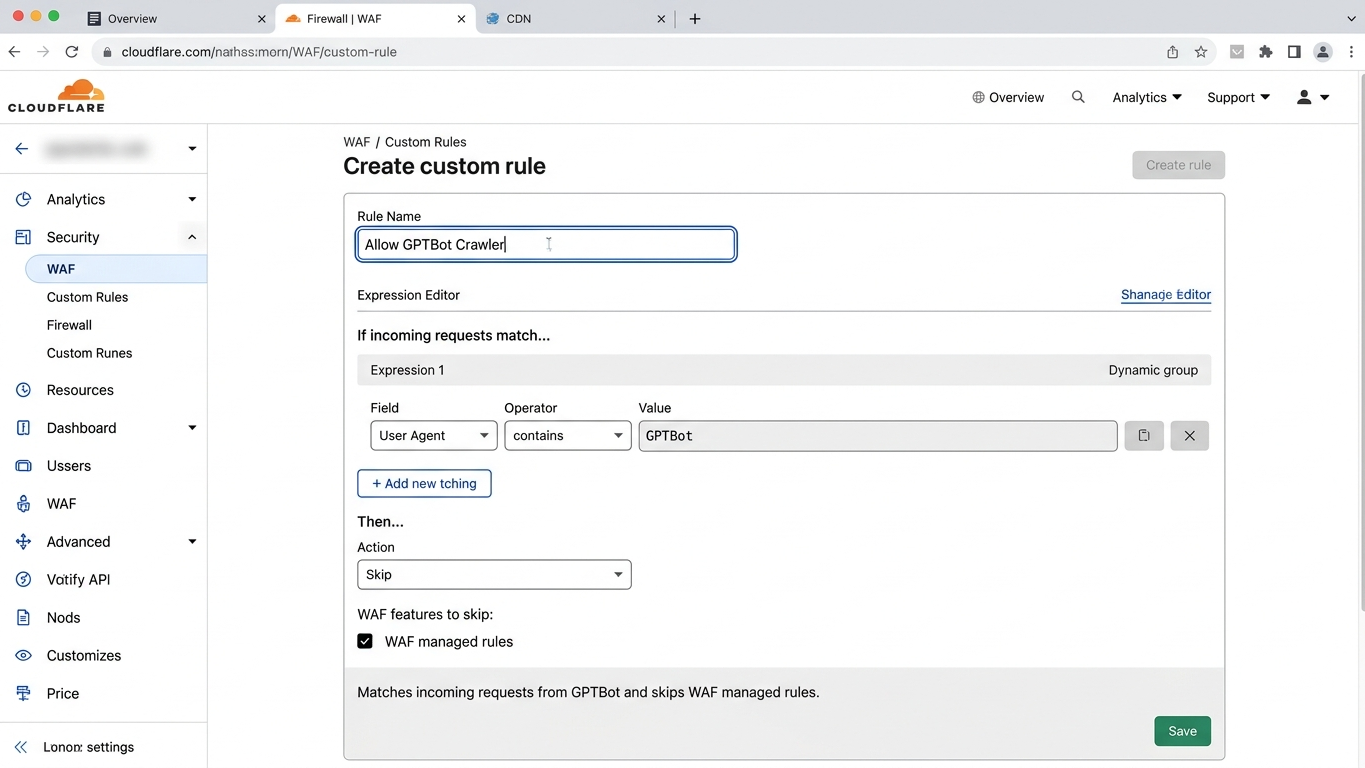
Open your Cloudflare dashboard and go to Security, then WAF and then Custom Rules. Here you create rules that allow specific user agents through before bot protection blocks them.
Create an allow rule for AI-crawlers
Create a new Custom Rule with the following logic:
- Rule name: "Allow AI Crawlers"
- Field: User Agent
- Operator: contains
- Value: GPTBot
Add additional conditions with "Or" for each crawler you want to allow. Set the Action to "Skip" and select which security layers you want to bypass for these user agents. Choose at least "Bot Fight Mode" and "Super Bot Fight Mode".
Set priority
Place this rule above your other WAF rules. Cloudflare processes rules from top to bottom. If a blocking rule is executed first, your allow rule will never reach the crawler.
Step 3: validate with Cloudflare Analytics
Configuration without validation is guesswork. After setting up your rules, you need to confirm that AI-crawlers are actually being allowed through.
In your Cloudflare dashboard, go to Security and then Events. Filter for the user agents you've allowed. You're looking for two signals:
- Successful requests (200 status) from GPTBot, ClaudeBot and other allowed crawlers
- No "Managed Challenge" or "Block" actions for these user agents
Check this daily for the first week. AI-crawlers don't visit your site continuously, so it may take a few days before you see results.
Step 4: combine with robots.txt for fine-grained control
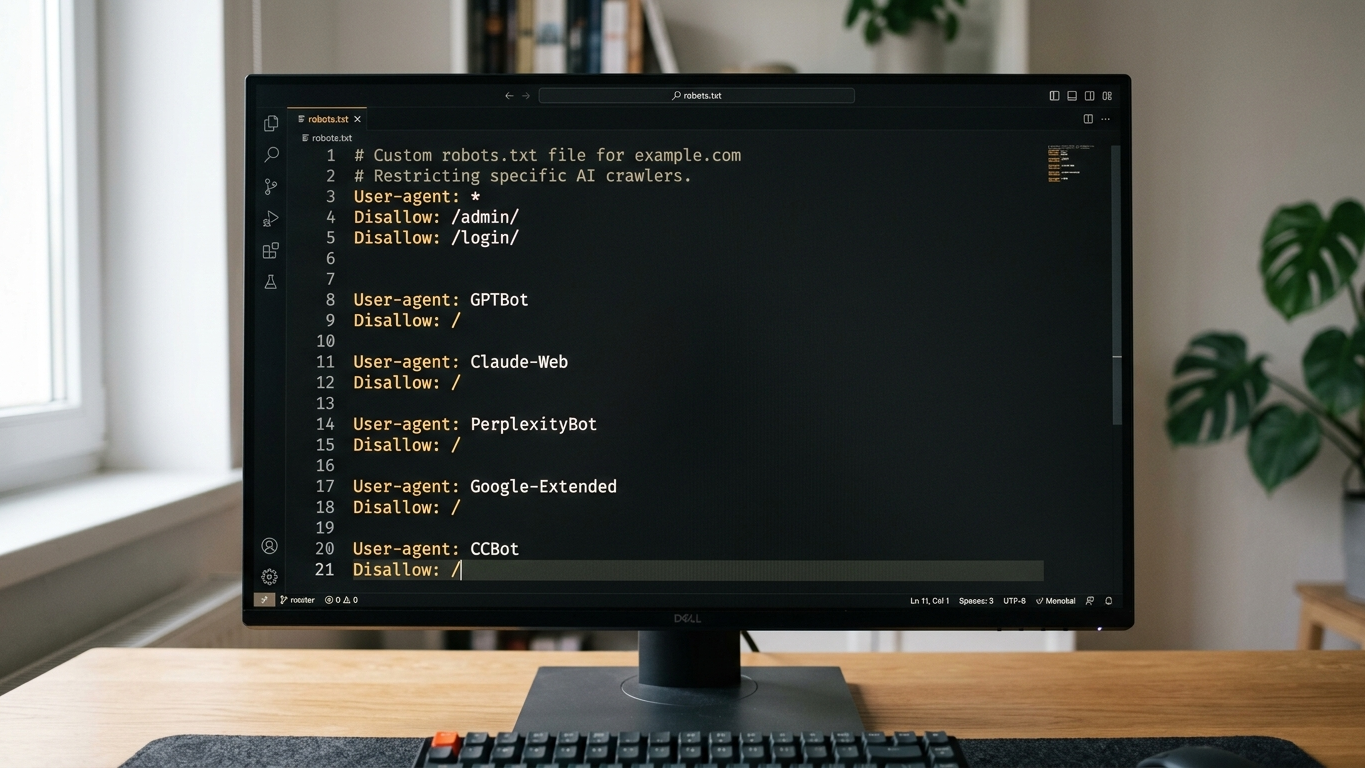
Cloudflare determines whether a crawler reaches your server. Your robots.txt determines which pages the crawler may index. Use both layers together for maximum control.
A common mistake is allowing AI-crawlers through Cloudflare but then blocking them in robots.txt. Or vice versa. Make sure your configuration is consistent at both levels.
Want immediate insights into how AI engines are currently interpreting your website? Start a scan on GrowthScope and receive your GEO Readiness Score within minutes.
Common mistakes with Cloudflare and AI-crawlers
Even experienced developers fall into these traps:
- Bot Fight Mode enabled globally without exceptions. This is the most common cause of AI invisibility. The mode blocks virtually all automated traffic.
- IP-based whitelisting. AI-crawlers use changing IP addresses. User agent-based rules are more reliable.
- No monitoring after configuration. Cloudflare updates can affect your custom rules. Integrate a monthly check into your sprint.
- Only modifying robots.txt. If Cloudflare is already blocking the crawler at the network level, your robots.txt will never be read.
How to maintain structural control of AI crawlability
This configuration is not a one-time action. AI companies regularly introduce new crawlers. Cloudflare continuously adjusts its bot detection. What works today may function differently next month.
Schedule a quarterly review in your technical sprints. Verify that existing rules are still active, check if there are new AI-crawlers you need to allow, and whether your GEO score remains stable.
By consciously configuring Cloudflare bot management, you ensure that your technical GEO foundation remains solid. Security and discoverability don't exclude each other.
With the right rules they reinforce each other. Want to immediately validate whether AI-crawlers can actually reach your site? Get in touch or start your audit today.